Generate interfaces.
Keep control.
Build ChatGPT-style interactive interfaces in your React app. OpenDIL renders DIL (Dynamic Interface Language), combining Markdown, charts, and interactive controls in one streaming document.
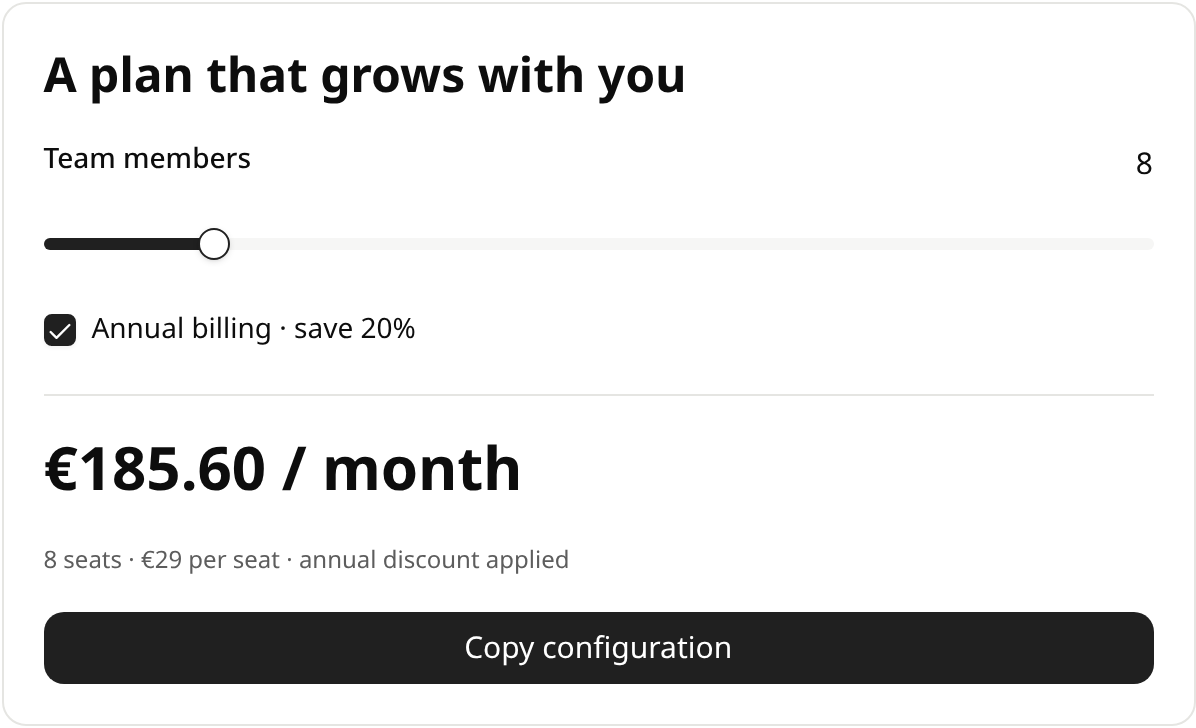
<title size="xl">Plan your team budget</title>

Adjust the team. See the numbers respond.

{@body const [seats, setSeats] = DIL.useState(8)}
{@body const [annual, setAnnual] = DIL.useState(false)}

<row justify="between" align="center">
  <label>Team members</label>
  <text tabularNums>{seats}</text>
</row>
<slider
  aria-label="Team members"
  min={1}
  max={30}
  value={seats}
  onChange={setSeats}
/>
<checkbox checked={annual} onChange={setAnnual} lineThrough={false}>
  Annual billing · save 20%
</checkbox>

{@body const monthly = seats * 29 * (annual ? 0.8 : 1)}

<divider />
<row justify="between" align="center">
  <caption>Estimated monthly cost</caption>
  <title size="2xl">€{monthly.toFixed(2)}</title>
</row>
<divider />

<title>Your first three months</title>
<Chart content={{
  chartType: "bar",
  xKey: "month",
  series: [{ dataKey: "cost", label: "Total cost (€)" }],
  data: [1, 2, 3].map((month) => ({
    month: "Month " + month,
    cost: monthly * month,
  })),
}} />

<caption>Illustrative pricing · €29 per member / month</caption>

<divider />
<row justify="between" align="center">
  <title size="lg">Billing summary</title>
  <badge color={annual ? "success" : "secondary"}>{annual ? "Annual plan" : "Monthly plan"}</badge>
</row>
<text color="secondary">
  Your workspace includes unlimited projects, shared dashboards, and version
  history for every team member.
</text>
<row justify="between">
  <text>Annual equivalent</text>
  <text tabularNums>€{(monthly * 12).toFixed(2)}</text>
</row>
<row justify="between">
  <text>Annual billing saves</text>
  <text tabularNums>€{(seats * 29 * 12 * 0.2).toFixed(2)}</text>
</row>
<button variant="outline" onClick={() =>
  GenUI.copy(
    JSON.stringify(
      {
        seats,
        annual,
        monthly,
      },
      null,
      2,
    ),
)}>Copy configuration</button><title size="xl">Plan your team budget</title>
Adjust the team. See the numbers respond.
{@body const [seats, setSeats] = DIL.useState(8)}
{@body const [annual, setAnnual] = DIL.useState(false)}
<row justify="between" align="center">
<label>Team members</label>
<text tabularNums>{seats}</text>
</row>
<slider
aria-label="Team members"
min={1}
max={30}
value={seats}
onChange={setSeats}
/>
<checkbox checked={annual} onChange={setAnnual} lineThrough={false}>
Annual billing · save 20%
</checkbox>
{@body const monthly = seats * 29 * (annual ? 0.8 : 1)}
<divider />
<row justify="between" align="center">
<caption>Estimated monthly cost</caption>
<title size="2xl">€{monthly.toFixed(2)}</title>
</row>
<divider />
<title>Your first three months</title>
<Chart content={{
chartType: "bar",
xKey: "month",
series: [{ dataKey: "cost", label: "Total cost (€)" }],
data: [1, 2, 3].map((month) => ({
month: "Month " + month,
cost: monthly * month,
})),
}} />
<caption>Illustrative pricing · €29 per member / month</caption>
<divider />
<row justify="between" align="center">
<title size="lg">Billing summary</title>
<badge color={annual ? "success" : "secondary"}>{annual ? "Annual plan" : "Monthly plan"}</badge>
</row>
<text color="secondary">
Your workspace includes unlimited projects, shared dashboards, and version
history for every team member.
</text>
<row justify="between">
<text>Annual equivalent</text>
<text tabularNums>€{(monthly * 12).toFixed(2)}</text>
</row>
<row justify="between">
<text>Annual billing saves</text>
<text tabularNums>€{(seats * 29 * 12 * 0.2).toFixed(2)}</text>
</row>
<button variant="outline" onClick={() =>
GenUI.copy(
JSON.stringify(
{
seats,
annual,
monthly,
},
null,
2,
),
)}>Copy configuration</button>Useful before it’s finished.
Readers can interact with content that has arrived while the rest keeps streaming. Pass in the growing text; OpenDIL handles the rendering.
More than a text response.
Mix Markdown, charts, tables, diagrams, and form controls. Add reactive state and expressions to make the document respond to its reader.
A boundary you can inspect.
The default renderer uses a sandboxed iframe and bounded expression workers. Choose host or shadow mode when your application needs custom components.
Performant prefix memoization and virtualization
Send the growing source prefix. OpenDIL keeps the parsed document and existing control state, then processes the new suffix.
Reuse the prefix
The completed source prefix is memoized: each new chunk extends the parsed document instead of rebuilding it. Existing controls keep their identity, state, and focus. Expression results are cached too, then refreshed when their dependencies change.
Mount what’s visible
Large flows and repeated tables use virtualization. Offscreen content leaves the DOM while its document state remains.
Choose the boundary
Iframe + CSP provides the strongest security and isolation. Shadow DOM isolates styles. Host renders directly in your application’s DOM with the lowest isolation overhead.
All modes execute expressions in separate, isolated QuickJS runtimes with bounded memory and execution time.
Compare isolation modesInterfaces that arrive ready to use.
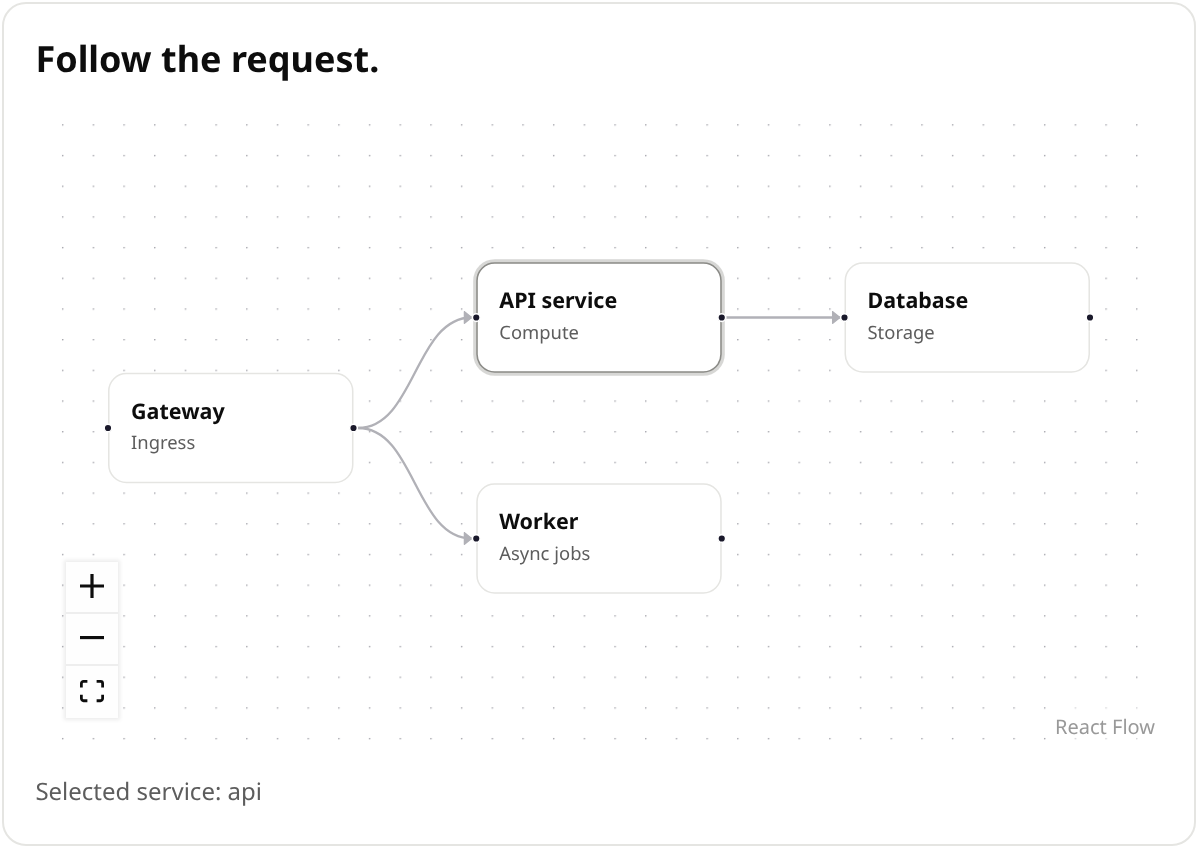
Calculators, tables, charts, and diagrams, described in the same document language.
Open source. Open to what you build.
Read the language. Explore the runtime. Make it part of your application.